渲染器選擇 mental ray > 在Render Elements渲染通道裡
> 增加一個 mr Shader Element通道 > 在mr Shader Element的參數屬性裡面
> shader裡增加一個貼圖 ─ Ambient/Reflective Occlusion(3dsmax)
Vray的AO效果不好,沒有直接可用的Render Elements,而且不支援Bump
mental ray的AO支援Bump,而且可以直接出Render Elements!
測試效果
☞ 詳閱全文 Read more...
2009年11月6日 星期五
3ds max mental ray的AO


3ds max 燈光預覽設置
快捷鍵:Ctrl + L
在還沒有架設燈光之前,光影的方向依據“檢視視窗”的“視角”改變,也就是光是從檢視視窗為起點打向視窗。由於在動畫設置時經常必須檢視各個角度,但是如果加了燈光之後,光影的方向就被燈光所固定,很有可能在背光製作上會不方便,因為背光時的陰影是黑的,所以下列方法可以將打燈後的預覽設置改為預設。
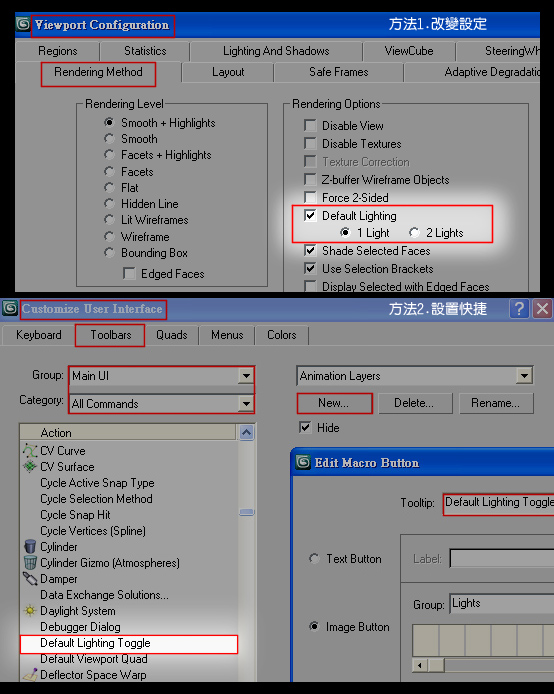
方法1.改變設定:
Viewport Configuration > Rendering Method > Default Lighting打勾
方法2.設置快捷開關
可以在Customise User Interface設置一個按鈕,做切換開關
↓一盞預設燈與兩盞預設燈的不同:
一盞預設燈會改變方向
兩盞預設燈為固定方向
☞ 詳閱全文 Read more...


2009年11月5日 星期四
MAYA 2009 10/29 課堂
1. Blend Shape (類似3ds max的Morpher工具)
Create Deformers > Blend Shape
先選子>後選母> Blend Shape
-----------------------------
2. Wire Tool
Create Deformers > Wire Tool
啟用Wire Tool(游標變成十字) > 先點model > Enter > 後點Curves線 > Enter
-----------------------------
3. Aim (類似3ds max的Look at工具)
Constrain > Aim
-----------------------------
4. Driven key (類似3ds max的Reaction Manager工具)
Animate > Set Driven Key
☞ 詳閱全文 Read more...


2009年11月3日 星期二

3ds max_Current Transform
如果想要只調旋轉,卻出現“影隔內的東西太多”的時候,也會調到移動會相當不方便
可以使用這個方法。
使用 Current Transform 可以只顯示 所要調整“對象”的時間軸
如:移動、旋轉...等等。
☞ 詳閱全文 Read more...

3ds max-Biped_創造四肢的IK對象物件
運用此功能可以選擇Biped四之外的物件做IK,來控制物件,必須在關鍵影格下使用。
Join to PreV IK Key 與 
○ Body 就是取消使用
● Object 啟用
☞ 詳閱全文 Read more...

2009年11月1日 星期日
單字
property、allow
property['普拉婆踢]
1. 財產,資產;所有物[U]
This small house is my only property.
這所小房子是我的唯一財產。
2. 房產,地產,房地產[C][U]
3. 花園住宅[C]
4. 特性,性能,屬性[C]
He is studying the medicinal properties of wild plants.
他正在研究野生植物的藥物特性。
5. 道具[P1]
6. 所有權,財產權[U]
There is no property in the seashore.
海岸非任何人私有。
-------------------------
allow['俄勞]
vt.
1. 允許,准許[O2][+v-ing]
2. 准...進;准...出[O]
He doesn't allow cats in the room.
他不允許貓進入房內。
3. 給與,提供;容許[O1][(+for)]
Their teacher allowed them three days for the assignment.
他們的老師給他們三天時間完成作業。
4. 使成為可能[O2]
The windfall allowed me to buy a house.
這意外之財使我得以購置一幢房子。
5. 認可
The judge allowed the claim.
法官同意了這一請求。
6. 【書】承認[+that]
He allowed that they were right.
他承認他們是對的。
vi.
1. 容許[(+of)]
The situation allows of no delay.
情況不容許有任何延誤。
2. 考慮[(+for)]
In working with this cloth, be sure to allow for shrinking.
用這種布縫衣,務必考慮到洗後會縮水。
☞ 詳閱全文 Read more...
3ds max X鍵 居然無效?
一直以來,按X鍵等於按下這個功能
結果2009居然不同步
害我的X鍵 居然無效
原來是動到這個
還有,我的max 2009的O鍵竟然也沒有反應
O鍵的用途是,視角旋轉時所有物件都會以“線框的BOX”模式來顯示,藉以減輕顯示的負擔,東西一但多又複雜的時候很好用!
☞ 詳閱全文 Read more...

3ds max 筆記
(1)
按 F3 會切換 面 和 純線框 的模式
在 有面的顯示下
按 F4 切換 有沒有線框 的模式
但
關掉線框模式會比較省資源
較不會累格
(2)
使用這個 Key Mode Toggle 模式 以後
按“”就會直接跳關鍵影格
(3)
這裡是改變 中心點與形狀 之間的關係,也就是說,如果按下Transrom and Scale 那他的旋轉和大小 就會變成 Poly 本身的型態。
(4)
物件座標真正的歸零
使用Link之後,X,Y,Z 的(0,0,0)
就以Parent物件的中心點為主
如果想要“以當前物件自身為中心點”
當作“XYZ軸的起始值(0,0,0)”
就用上圖的Freeze Transform
以及 Freeze Rotation
☞ 詳閱全文 Read more...


訂閱:
文章 (Atom)


 發表文章
發表文章

